100%at the limit
Preference orderBackup accountAuto switch
Only at the limit, by threshold (warn and switch, for example at 90% and 95%) or rotating through the day. With preference order and a backup account.
Reveza AI looks after several AI coding assistant accounts: it switches the account on your computer when the limit arrives (or earlier, if you prefer), keeps the logins in an encrypted vault and shows what each account delivered.
npx github:dantaspaulo/revezaAt a glance
The dashboard
The account in use on each computer, burn rate, when each one runs out and what needs attention. The dashboard lives on your Vercel and the data on your Supabase.
Which account each computer is using, how much of the 5-hour window and of the week is gone, and the warnings that need action.
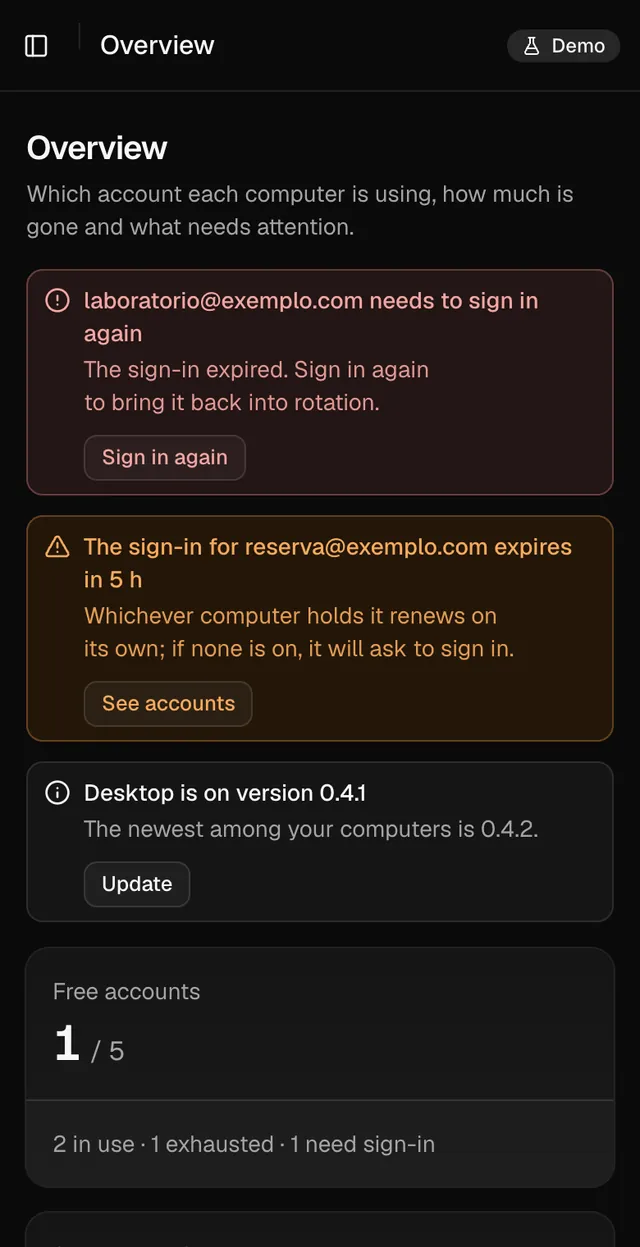
Dashboard in demo mode, with sample data.
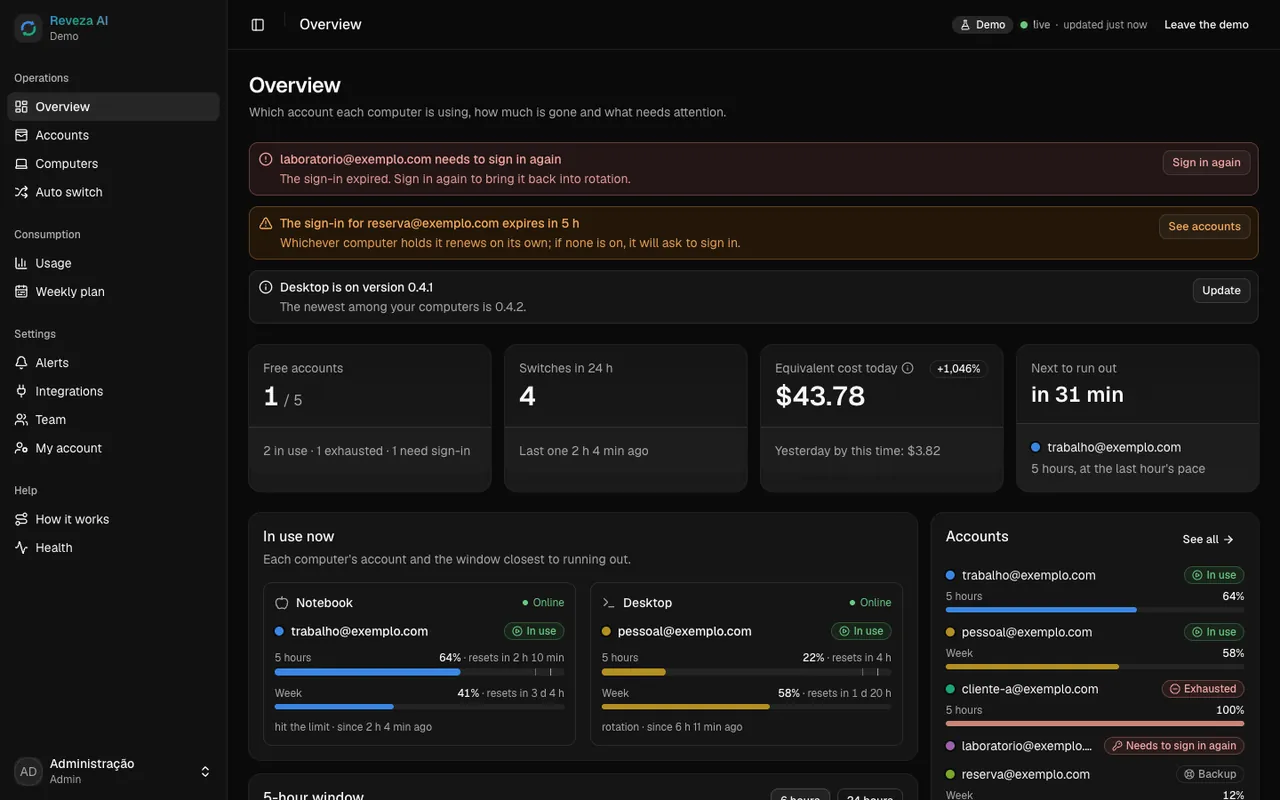
Dashboard in demo mode, with sample data.
How it works
The cloud stores only ciphertext and decides who uses what. The computer itself does the switch.
01 · Store
You sign in to each account through the tool's official login, on your computer. Reveza never asks for an account password.
Each login is encrypted with AES-256-GCM under a key that lives only in the system keychain.
Supabase receives only ciphertext. Neither it, nor Vercel, nor the project's author can read it.
02 · Switch
Every minute, and the moment a limit warning arrives, it picks each computer's account by the rule you set.
The agent polls for the decision every 5 seconds (no open port), decrypts the login and swaps the local credential.
The session that hit the limit resumes where it stopped, already on the new account. An alert can tell you what happened.
Features
Everything you need to rotate accounts without thinking about it.
Only at the limit, by threshold (warn and switch, for example at 90% and 95%) or rotating through the day. With preference order and a backup account.
1# Read the state2BASE=seu-projeto.supabase.co/functions/v1/api34curl -s $BASE/estado \5 -H "Authorization: Bearer $REVEZA_CHAVE"{
"ok": true,
"computadores": [{
"nome": "Notebook",
"conta": "trabalho@exemplo.com",
"cinco_horas": 64
}]
}Personal keys with scopes (read, switch), revocable, and outgoing webhooks for n8n, scripts and whatever else you use.
Laptop switched accounts
nowwork → personal · hit the limit
Account near the limit
nowwork reached 90% of the 5 h window
Sign-in about to expire
nowclient-a · no computer renewed it
Telegram, ntfy, email, webhook and phone push. Each channel picks the events it wants.
Laptop · work → personal
hit the limit
work · 90% of the window
warning sent
Desktop · session resumed
on the new account
client-a · sign-in renewed
by the Server
Daily summary
today's usage and cost
personal · 58% of the week
on pace
Server · online
up to date
The dashboard installs on your phone's home screen (PWA), with accounts, usage and alerts at hand.
reveza status, trocar, uso --csv and doctor in the terminal. Inside the session, /reveza sums up the accounts and the status line shows the one in use.
Laptop, desktop, server. Each one with its own identity, revocable on its own, and an account stays with one computer at a time.
Security
Each account's login is encrypted on the computer. Whoever stores the vault does not hold the key, and the dashboard keeps no secrets.
AES-256-GCM with a fresh nonce on every write and the account bound to the ciphertext: one account's entry cannot be swapped for another's.
Required for admins. Public sign-up is off: only invited people get in, through a single-use link.
Every action that changes something goes through a function that checks the role, validates the input and writes the audit log.
The dashboard uses only the public key and the signed-in user's token, under a strict CSP. The server key stays in Supabase.
Its own user, a long password in the keychain, revocable without touching the others. It only calls the cloud; no open port.
where the account is used
Supabase and Vercel, in your name
whoever wrote Reveza
Per the architecture published in the repository (docs/ARQUITETURA.md). Swipe sideways to see every column.
Usage and cost
The agent reads each computer's transcripts and adds up tokens, replies, sessions, agents and equivalent cost, per hour, account, model, project and computer.
What the usage would cost at the API price list. Not a bill.
Input, output and cache, per account and per model.
With the agents each one spawned and what each one cost.
Sample numbers. On your dashboard they come from your computers' transcripts, aggregated by the hour.
Install
Agent, accounts, cloud, dashboard, domain and alerts. You can start by just looking, in demo mode.
$ npx github:dantaspaulo/reveza
On macOS, Linux or Windows. The agent uses only Node's built-in modules.
It must be installed on each computer that will rotate accounts.
Free accounts are enough to start. The installer creates the project and deploys the dashboard.
Optional, with a step-by-step guide on Cloudflare. Without it, the dashboard stays on the Vercel address.
Step by step
The installer walks you through it with questions, in the order below. Auto switch starts off: you turn it on when you want.
View on GitHubWant to look first? Run it with --demo.
It checks the system and installs the agent and the session module on the computer.
Official sign-in for each one, right there. Each account gets a color, a priority and, if you like, a backup role.
With a Supabase token it creates the project, applies the database and functions and creates the admin with two-factor.
Sign in to Vercel and the dashboard goes live with security headers. Your own domain is optional.
Telegram, ntfy, email, webhook or phone, with a test message to confirm.
reveza doctor runs and a command from the dashboard reaches the computer. If it arrived, you are set.
What usually comes up before installing. The rest is in the repository.
Reveza AI is open source and free, under the MIT license. Supabase and Vercel have free plans, and the installer works with them. Your AI service accounts stay yours, as they already are.
One command, a few questions and the dashboard live in your own cloud. Nobody else's server in the middle.